

Executive Brief
This deployment demonstrates a modern, secure approach to cloud infrastructure management using Infrastructure as Code (IaC) principles with Bicep. By combining Azure DevOps pipelines, Azure Key Vault for secret management, and Just-in-Time (JIT) VM access, we've created a repeatable, auditable, and highly secure deployment pattern.
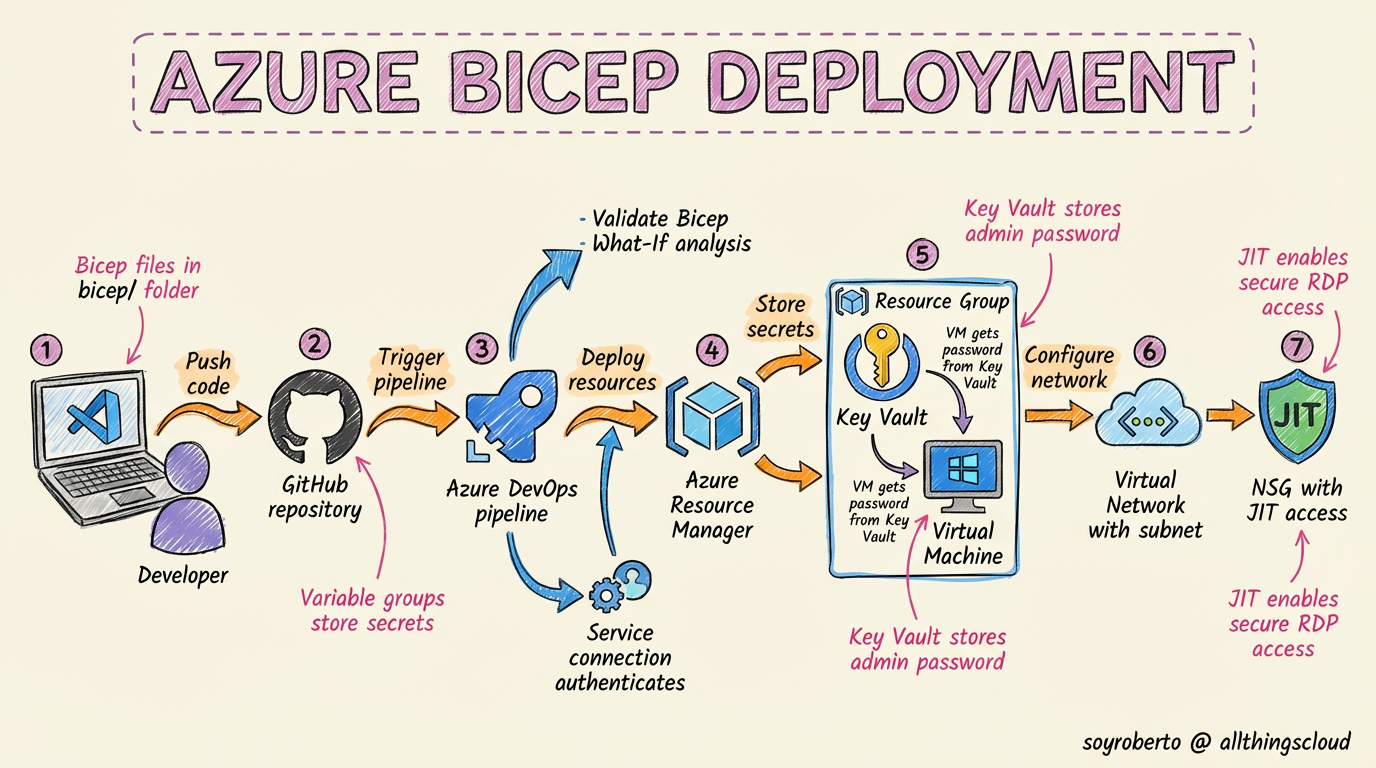
The Repo:
Key Benefits & Why This Approach Matters:
Infrastructure as Code (Bicep):
Version-controlled infrastructure - Every change is tracked in Git
Consistent deployments - Eliminates configuration drift
Self-documenting - Bicep files serve as living documentation
Collaboration enabled - Team members can review and approve changes via PRs
Secure Secret Management with Azure Key Vault:
No hardcoded credentials in code or pipelines
Centralized secret management - Single source of truth for passwords
Automatic rotation support - Easy password rotation without redeployment
Access auditing - Track who accessed secrets and when
Azure DevOps CI/CD Pipeline:
Automated validation - Bicep syntax and what-if analysis
Controlled deployments - Approval gates and environment promotion
Audit trail - Complete history of who deployed what and when
Rollback capability - Easy to revert to previous versions
Just-in-Time (JIT) VM Access:
Zero standing access - No open RDP/SSH ports by default
Time-limited access - Connections automatically expire (max 3 hours)
Approval workflow - Request/approve access through Defender for Cloud
Attack surface reduction - Eliminates 24/7 exposure to brute force attacks
Compliance friendly - Meets strict security requirements (NIST, CIS, etc.)
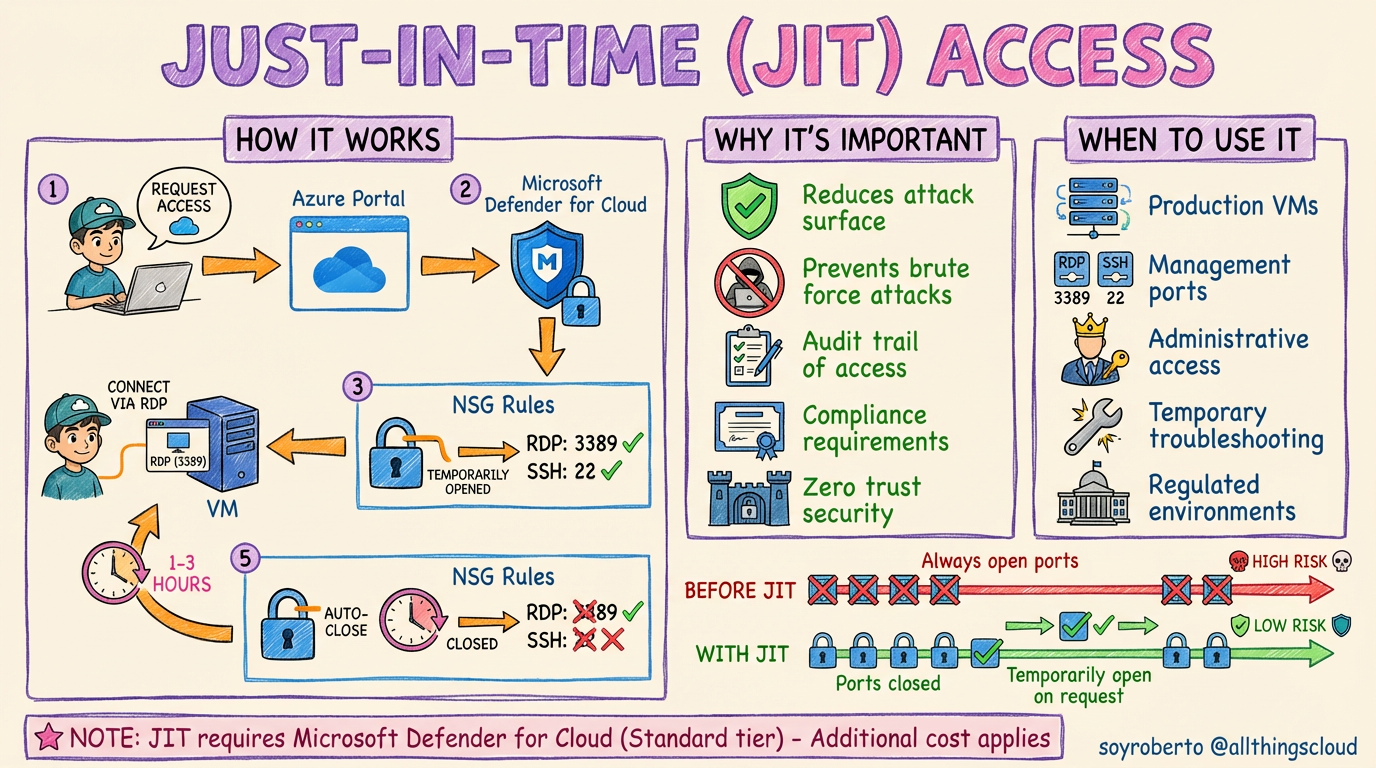
This approach transforms traditional VM deployment from a manual, error-prone process into a repeatable, secure, and compliant operation that scales across teams and environments.
Complete Deployment Journey: Step-by-Step
Phase 1: Initial Setup & Repository Creation
| Step | Where Performed | Action | Commands/Details |
| 1. Create GitHub Repository | GitHub.com | Created new repository for infrastructure code | https://github.com/soyroberto/bicex |
| 2. Clone Repository Locally | Local Terminal | Set up local working directory | git clone https://github.com/soyroberto/bicex.git |
| 3. Create Project Structure | Local Filesystem | Organized Bicep files and pipeline | Created bicep/ directory and azure-pipelines.yml |
Phase 2: Bicep Template Development
| Step | Where Performed | Action | Commands/Details |
| 4. Create Main Bicep Template | bicep/main.bicep | Defined VM with SQL Server 2019 | Parameters for VM name, size, networking, Key Vault reference |
| 5. Create Parameter File | bicep/main.bicepparam | Defined non-sensitive configuration | VM name, admin username, location, subnet details |
| 6. Implement Key Vault Integration | bicep/main.bicep | Added secure password retrieval | reference() function for Key Vault secret value |
Phase 3: Azure Resource Preparation
| Step | Where Performed | Action | Commands/Details |
| 7. Create Resource Group | Azure Portal/CLI | Set up target resource group | RGAUANSDeploy in australiasoutheast |
| 8. Create Key Vault | Azure Portal/CLI | Set up secure secret storage | kvaueansdeploy with RBAC authorization |
| 9. Store VM Password | Azure Key Vault | Created secret for VM admin password | Secret name: vmAdminPassword |
| 10. Verify Existing Network | Azure CLI | Confirmed VNet and NSG availability | vnetausclient and nsgauejit in RGAUSNetCh |
Phase 4: Azure DevOps Pipeline Setup
| Step | Where Performed | Action | Commands/Details |
| 11. Create Service Connection | Azure DevOps | Connected Azure subscription | Service principal: AzureServiceConnection |
| 12. Create Variable Group | Azure DevOps → Library | Stored non-sensitive configuration | Group: bicep-deployment-secrets with 7 variables |
| 13. Set Secret Variables | Variable Group | Added sensitive resource IDs | VNET_RESOURCE_ID and NSG_RESOURCE_ID (marked secret) |

Phase 5: Permission Configuration
| Step | Where Performed | Action | Commands/Details |
| 14. Grant Key Vault Access | Azure CLI | Added RBAC roles for service principal | Key Vault Secrets User role assignment |
| 15. Grant Network Permissions | Azure CLI | Enabled pipeline to modify network | Network Contributor on VNet resource group |
| 16. Grant Resource Group Access | Azure CLI | Enabled pipeline to create resources | Contributor on target resource group |
Phase 6: Pipeline Development & Testing
| Step | Where Performed | Action | Commands/Details |
| 17. Create Pipeline YAML | azure-pipelines.yml | Defined CI/CD workflow | Single stage with Bicep installation and deployment |
Phase 7: Deployment Execution
| Step | Where Performed | Action | Commands/Details |
| 18. Commit and Push Code | Local Terminal | Triggered pipeline via Git push | git add . && git commit -m "Ready" && git push origin main |
| 19. Monitor Pipeline Execution | Azure DevOps Portal | Watched real-time deployment logs | Validated each step: checkout → Bicep install → VM deployment |
| 20. Verify Deployment Success | Azure Portal | Confirmed VM creation | vmausbixvm01 running in RGAUANSDeploy resource group |

Phase 8: Post-Deployment Configuration
| Step | Where Performed | Action | Commands/Details |
| 21. Retrieve VM Password | Azure CLI | Retrieved admin credentials from Key Vault | az keyvault secret show --vault-name kvaueansdeploy --name vmAdminPassword |
| 22. Get VM Public IP | Azure CLI | Retrieved connection endpoint | az vm show -g RGAUANSDeploy -n vmausbixvm01 --query publicIps -o tsv |
| 23. Configure JIT Access | Microsoft Defender for Cloud | Enabled Just-in-Time VM access | Portal: Defender for Cloud → Just-in-time VM access → Enable on vmausbixvm01 |
Before Requesting access from the Remote Desktop Client:

Requesting Access


After JIT enabled

the NSG is enabled on the selected ports 3389
RDPing to the VM

Key Technical Decisions & Learnings
1. Bicep Over ARM Templates
Cleaner syntax - More readable than JSON ARM templates
Better tooling - VS Code extension with IntelliSense
Modular design - Can be broken into reusable modules
2. Pipeline Design Choices
Single-stage deployment - Simplified MVP approach
Inline script execution - Avoided external script dependencies
Variable groups - Centralized configuration management
3. Security Implementation
RBAC over access policies - More granular permission control
Secret retrieval at runtime - Never stored in pipeline variables
JIT-ready NSG - Pre-configured for zero-standing-access model
4. Error Resolution Process
Iterative debugging - Fixed issues in sequence:
Pipeline script location configuration
Parameter file syntax compatibility
Key Vault secret retrieval method
VM image patch settings compatibility
Future Enhancement Opportunities
Multi-environment pipelines - Dev, Test, Prod promotion
Bicep modules - Reusable network, storage, and security components
Integration testing - Post-deployment validation scripts
Cost optimization - Auto-shutdown schedules and sizing recommendations
Monitoring integration - Azure Monitor alerts and dashboards
Conclusion
This deployment demonstrates an automated deployment for a secure Azure VM that balances, automation, and maintainability. By leveraging Infrastructure as Code, secure secret management, and Just-in-Time access, organizations can significantly reduce their attack surface while maintaining operational efficiency.
The complete solution took approximately 4 hours from initial repository creation to successful VM connection, with the majority of time spent on configuration and debugging rather than manual infrastructure provisioning. Subsequent deployments would take under 15 minutes (ideally)
Roberto
About the author
I'm technologist in love with almost all things tech from my daily job in the Cloud to my Master's in Cybersecurity and the journey all along.
Comments
Join the discussionNo comments yet. Be the first to comment.


